

iOS 18.2: Why Updating Your iPhone Is More Crucial Than Ever
Hey everyone, let’s talk about the buzz around Apple’s latest iOS update—iOS 18.2. This is not just another routine update; it’s a significant one packed with groundbreaking features and critical security fixes. If you’re an iPhone user, especially one who values both innovation and security, this update is for you.
So, what’s the deal with iOS 18.2? First, it addresses 21 vital security vulnerabilities , including flaws in the iPhone Kernel and WebKit, the engine behind Safari. Some of these flaws, if left unpatched, could allow attackers to execute malicious code on your device or even crash essential system functions. That alone should be enough to hit that update button.
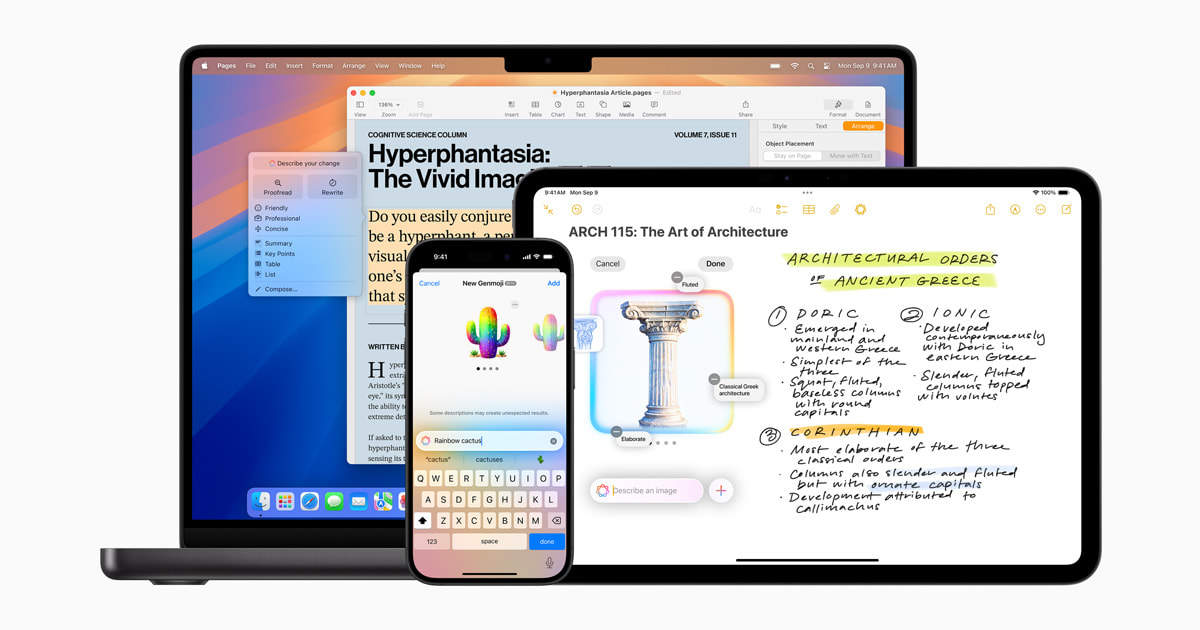
But it’s not just about safety—this update takes your iPhone experience to a whole new level. One standout feature is the integration of OpenAI’s ChatGPT with Siri and systemwide Writing Tools. Imagine asking Siri complex questions or creating polished text directly from your device without hopping between apps. It’s seamless, efficient, and makes multitasking a breeze. Whether it’s summarizing a document or generating creative content, the possibilities are endless.
Also Read:- Gen Z Ditches Tradition: Christmas Dinner Gets a Modern Twist with Fried Chicken, Pizza, and Cheesecake
- Eddie Redmayne Joins Julia Roberts in Sam Esmail’s ThrillerPanic Carefully
And then there’s the new Image Playground and Genmoji . Image Playground lets you craft unique visuals by combining themes, costumes, and even your own text descriptions. Genmoji, on the other hand, takes emojis to a personalized level—think emojis tailored to your friends, hobbies, or even your mood. It’s perfect for making chats more lively and personal.
The update also rolls out exciting tools for productivity, like Image Wand in Notes. This feature transforms rough sketches into polished graphics, bringing a creative edge to your notes. For the visually inclined, Camera Control now leverages Visual Intelligence to instantly analyze objects, translate text, or even provide context to what you see.
Here’s the kicker: if you’re still on iOS 17 and your device supports iOS 18, you no longer have the option to stay secure without upgrading. Apple has stopped releasing comprehensive security updates for older versions, so sticking with iOS 17 could leave your device vulnerable.
Updating is simple—go to Settings > General > Software Update —and takes just a few minutes. This is more than a software upgrade; it’s a step into a smarter, more secure, and creative iPhone experience. Don’t wait—make the jump to iOS 18.2 today!
Read More:


0 Comments